Feeder can translate the posts in your feeds into your language as they arrive. The title and excerpt are translated when a post comes in, and the whole article when you open it. Automatic translation is on the Plus plan and up.
How do I turn on automatic translation?
- Click Settings in the left sidebar.
- Choose Appearance.
- Under Language, pick a language in Auto-translate posts.
In the iPhone, iPad and Android apps, go to Settings, Language & translation, Auto-translate posts.
The setting is for your whole account, so it applies to every feed you follow, on the web and in the apps. To turn it off, choose Don't auto-translate. To translate only some feeds, leave it off and create a rule with the Translate posts action instead. See Rules: filter posts by keyword and automate actions.
What does a translated post look like?
- In your post lists, the title and excerpt are in your language, with a translate icon next to them.
- When you open the post, Feeder translates the whole article. A long article is translated up to about its first 1,000 words.
- Click Show original in the toolbar above the post to read it as it was written, and Translate post to switch back.
- Push notifications for new posts arrive translated.
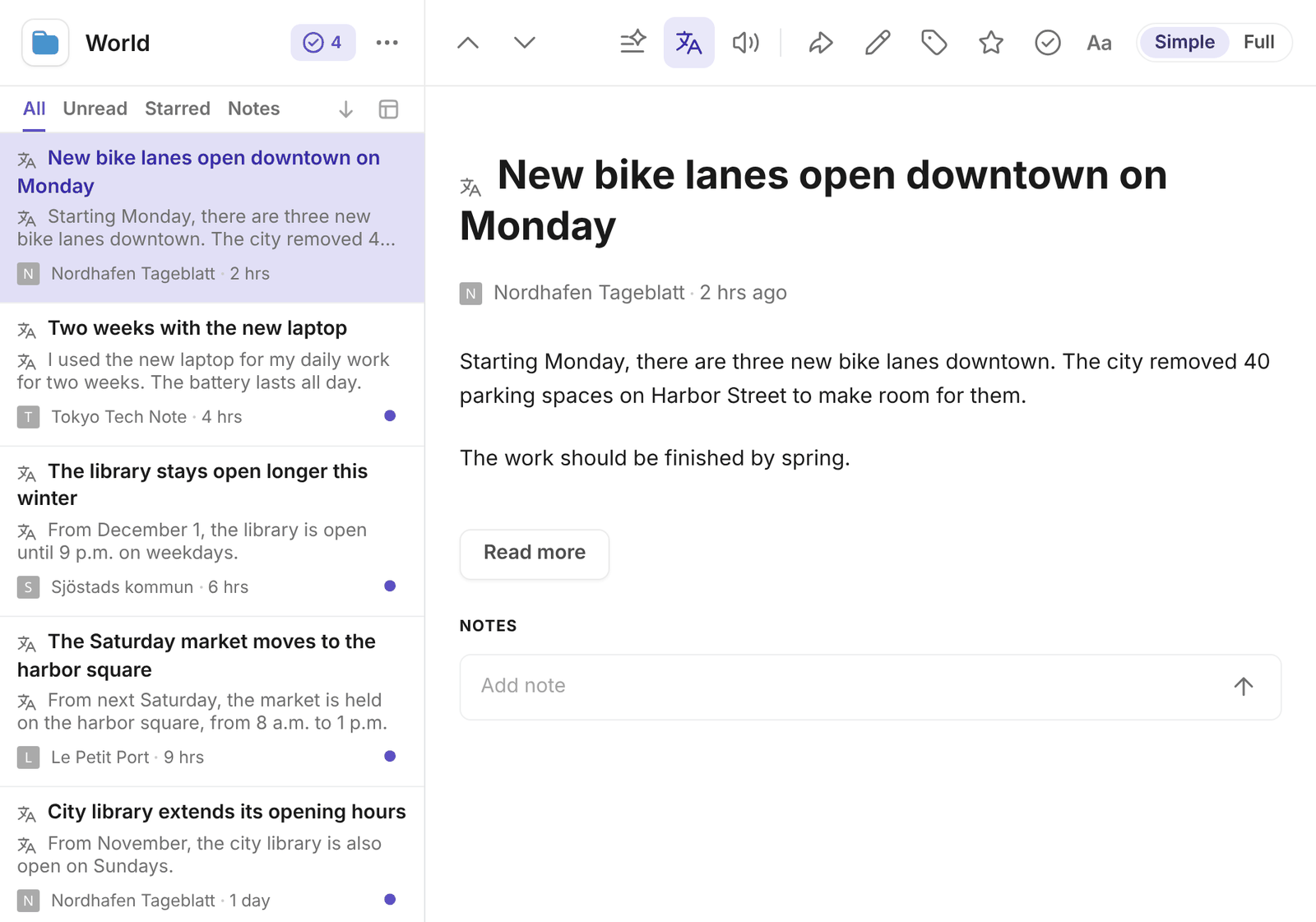
Posts that are already in your language are left as they are. Feeder can translate into 39 languages.
How many posts can Feeder translate?
- Plus: 10 posts a day
- Professional: 5,000 posts a day
- Enterprise: no limit
Every new post that Feeder translates for you counts toward your daily limit. Opening a post counts once more if nobody has translated that article yet. The Translate post button uses the same limit.
When you reach the limit, new posts arrive in their own language until the next day. Posts that are already translated stay translated. If you follow busy feeds in other languages, the 10 posts on Plus can run out early in the day. Professional translates up to 5,000 posts a day. See Pricing.
Common questions
Why isn't a post translated?
You may have reached your daily limit, or the post may already be in your language. If the setting says Off in AI settings, translations are turned off for your account: select Turn on, or switch Translations back on in Settings, AI.
Is this the same as changing Feeder's language?
No. Auto-translate changes the language of the posts. To change the language of Feeder's menus and buttons, see Change the language of Feeder.
What does Feeder send to translate a post?
The text of the post goes to the AI provider that translates it. A translation is saved and shared, so a post is only translated once for each language. See AI features in Feeder.
Still stuck? E-mail support@feeder.co with the name of the feed, and we'll help.