Email newsletters
Turn your feeds into a weekly email
Feeder drafts it from the sources you follow, you look it over, and it goes to your team or your readers. Every link goes to the original article.
Drafted from your sources
Pick a folder or a feed. Feeder reads its newest posts, features the ones worth reading, groups them under headings and writes a short summary on top.
In Feeder
- NASA Invites Media to Moon Landing Simulation Experience in California
- Hunting Red Leaves with Satellites
- NASA’s X-59 Aircraft and Test Pilot
- NASA, USDA Sign Agreement Advancing Earth Science, Agriculture
-
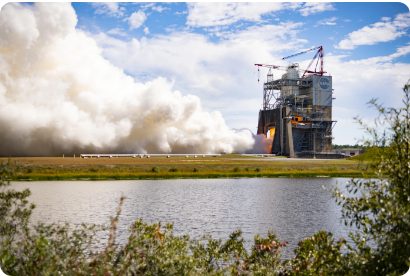
RS-25 Engine Tests at NASA Stennis
-
Artemis Acceleration (Oct. 23, 2026)
- NASA Shares Artemis Acceleration Plans for Moon Missions
- Sudden changes and slow burns
-
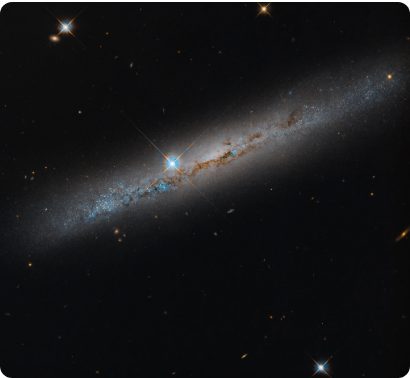
Spiral’s Edge
-
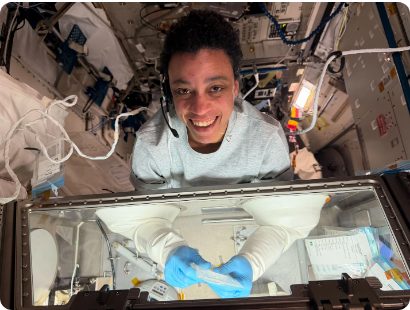
Science on the Space Station with NASA Astronaut Jessica Watkins
-
NASA Moon Base: Rovers and Lunar Terrain Vehicles (October 2026 Update)

-
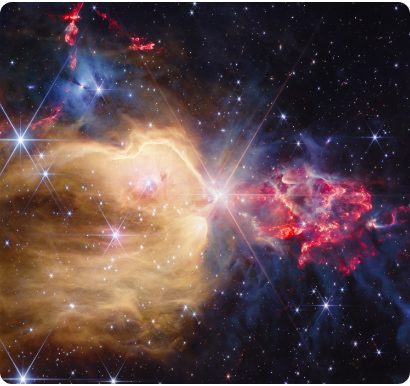
Webb Captures Stellar Jets
-
U.S. Spacewalk Preview News Conference (Oct. 20, 2026)

-
U.S. Spacewalk 100

-
Martian Dawn

Feeder's draft
NASA is shifting into high gear with new Artemis mission timelines and advanced lunar surface hardware. From engine testing to agriculture-focused satellite partnerships, the agency is expanding its terrestrial and extra-planetary footprint.
The Road to Artemis
As mission timelines tighten, NASA is focusing on the infrastructure and propulsion necessary to sustain a human presence on the lunar surface.
 NASA Image of the Day
RS-25 Engine Tests at NASA Stennis
NASA Image of the Day
RS-25 Engine Tests at NASA Stennis
 NASA on YouTube
NASA Moon Base: Rovers and Lunar Terrain Vehicles (October 2026 Update)
NASA on YouTube
NASA Moon Base: Rovers and Lunar Terrain Vehicles (October 2026 Update)
Life on the Station and Beyond
 NASA on YouTube
U.S. Spacewalk 100
NASA on YouTube
U.S. Spacewalk 100
A significant milestone is approaching for orbital operations as the agency prepares for its 100th U.S. spacewalk.
 NASA Image of the Day
Science on the Space Station with NASA Astronaut Jessica Watkins
NASA Image of the Day
Science on the Space Station with NASA Astronaut Jessica Watkins
Cosmic Perspectives
 NASA Image of the Day
Webb Captures Stellar Jets
NASA Image of the Day
Webb Captures Stellar Jets
Not quite right? Change any line, add a post, or ask for a new draft with a focus, such as “only the Moon missions”.
Every week, on its own
Pick a day and an hour. Feeder drafts the email from the posts since the last one, then sends it to you to look over, or straight to your recipients.
- Monday, 8:00 AM Feeder drafts The Week in Space from the week's new posts in Space.
-
In your inbox
The email Feeder sends you when the draft is ready. The Week in Space: your draft is ready Feeder drafted this week's email from your feeds. Look it over, change what you like, and send it. SubjectAccelerating the return to the Moon Posts8 - When you have a minute You change what you like and press Send.
- Monday, 8:00 AM 9 people get The Week in Space.
Your team, your clients, anyone
Your colleagues are in your Feeder account already, so one click adds them all. Paste a list for everyone else: they confirm their address before the first email.
- No Feeder account needed
- Recipients only need an email address. Each email has an unsubscribe link.
- Replies come to you
- The email is from your newsletter's name, and a reply goes to you or an address you choose.
9 people get the next email.
| Status | |
|---|---|
| you@example.com | Gets emails |
| ana@example.com | Gets emails |
| ben@example.com | Gets emails |
| chloe@example.com | Gets emails |
| david@example.com | Gets emails |
| elif@example.com | Gets emails |
| finn@example.com | Gets emails |
| grace@example.com | Gets emails |
| hiro@example.com | Gets emails |
| editor@client.example | Waiting to confirm |
| press@partner.example | Waiting to confirm |
| lena@university.example | Waiting to confirm |
Set it up in three steps
It all happens in Feeder, in about five minutes.
-
The New newsletter dialog: send posts from the Space folder, named The Week in Space. New newsletterSend posts from Space Feeder drafts each email from the newest posts there. You change the draft before it goes out. Name The Week in Space Readers see it as the sender. You can change it later.Pick the sources
A folder of the feeds you follow, or all of them. Give it a name.
-
The newsletter editor with the AI draft open and the blocks you can add. Add block Post Feed AI summary Text Heading Image Button DividerAccelerating the return to the Moon AI summary NASA is shifting into high gear with new Artemis mission timelines and advanced lunar surface hardware. From engine testing to agriculture-focused satellite partnerships, the agency is expanding its terrestrial and extra-planetary footprint. The Road to Artemis
NASA Image of the Day
RS-25 Engine Tests at NASA Stennis
Look over the draft
Change a line, add a post or a button, or draft it again.
-
Preview and send: a desktop preview of the email with Send test to me, Send later and Send buttons. Preview & sendDesktopMobile The Week in Space Summary The Road to ArtemisSend it, or pick a day
Send yourself a test first. Then send it now, at a set time, or every week.
Details
What goes into each email, and what your readers see.
Look
Six themes, from Classic to Carbon, or your own background, text and accent colors. Add your logo, a title and a line about the newsletter.
NASA Image of the Day
RS-25 Engine Tests at NASA Stennis
Blocks
A post with its picture, a feed's newest posts as a list or as cards, an AI summary, text, headings, images, buttons and dividers.
NASA Image of the Day
RS-25 Engine Tests at NASA Stennis
 NASA Image of the Day
Spiral’s Edge
NASA Image of the Day
Spiral’s Edge
Sender
Your newsletter's name is the sender, on Feeder's address. Replies go to you, or to an address you pick. Gmail, Yahoo and other mail apps show their own Unsubscribe button, which works in one click.
Results
Each email shows how many people got it, opened it and clicked a link in it. An address that bounces gets no more email from Feeder.
| Subject | To | Opened | Clicked |
|---|---|---|---|
| Accelerating the return to the Moon | 9 | 78% | 44% |
Questions
- Do the people I send to need Feeder?
- No, only an email address. Your team joins at once, and anyone else confirms their address before the first email.
- Can it go out without me?
- Yes, if you want. Every week Feeder drafts the email and either sends it to you to look over or sends it to your recipients by itself.
- What does the AI read?
- The headline, the source and the first lines of the newest 40 posts in the folder or feed you pick. It features 4 to 8 of them, groups them under headings and writes the summary. You can tell it what to focus on.
- How many people can I send to?
- 100 on Professional and 1,000 on Enterprise, counted across all your newsletters. Everyone on your lists counts, including people who haven't confirmed yet.
- Who is the email from?
- Your newsletter's name, sent from Feeder's address. Replies go to you, or to an address you choose.
- Can people sign up on our website?
- Not yet. You add people in Feeder: your team in one click, a list you paste, or one address at a time.
- Can I see who opened it?
- You see how many people opened each email and clicked a link in it, but not who.
- Is there a Feeder logo in the email?
- No logo. The footer says “Sent by Feeder” next to the unsubscribe link, and the rest is your name, logo and colors.
Start with your own feeds
Newsletters come with Feeder Professional, together with website widgets, RSS feeds and public dashboards.
| Free | Plus | Professional | |
|---|---|---|---|
| Price a month | Free | $9.99 | $19.99 per user |
| Feeds | 200 | 2,500 | 10,000 |
| Rules | No | Yes | Yes |
| Newsletter recipients | No | No | 100 |
Publish
Four tools to share your feeds, in Feeder Professional
$19.99 per user, per month
- Website widgets Your feeds in a box on any page, with no limit and no Feeder logo
- RSS feeds Your sources and rules as one feed for other apps
- Public dashboards A news page anyone can open, no sign-in
- Email newsletters This page The news by email, to up to 100 subscribers