Continuing the work to make rules even more powerful in Feeder we're launching a highly requested feature: Post to Webhook ✨
You can now build your own custom workflows & integrations with Rules that post new content straight to a Webhook of your choice. And just like with our other integrations, you can add powerful filters to make sure that only relevant posts come through. We are excited to see what you will build!
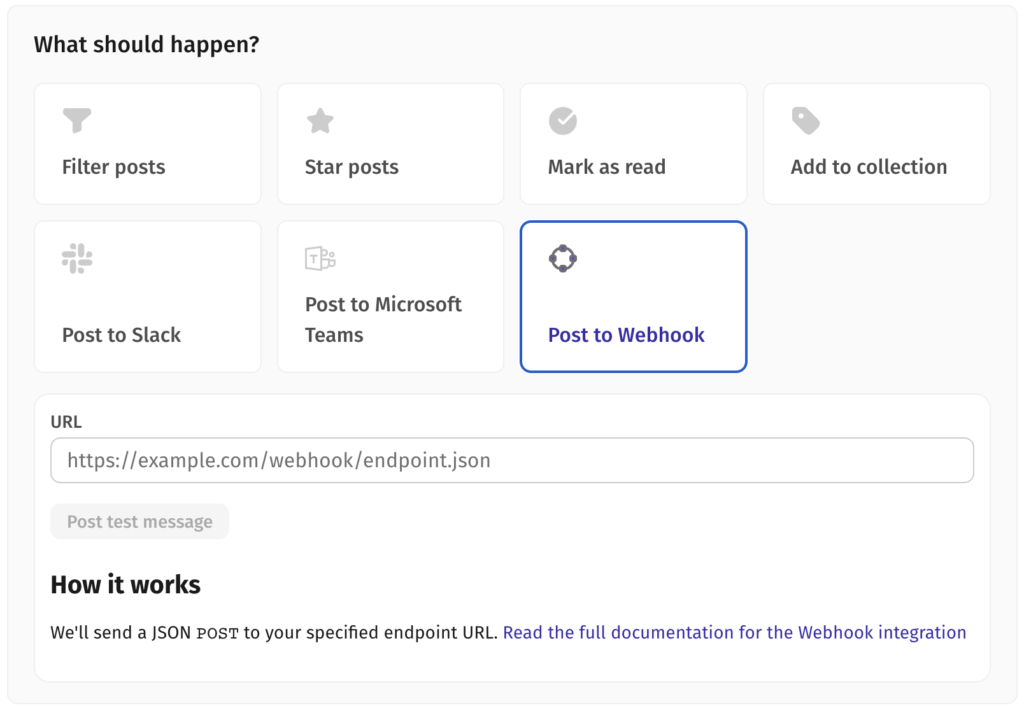
The new integration is available to all users on the Feeder Professional plan. And if you're not already a subscriber, you can read more and upgrade here.
Did you know?
Rules in Feeder lets you filter, star or add posts to collections - automatically. Whether you use Microsoft Teams or Slack (or any other software that support webhooks), you can create rules that forward all posts matching your criteria directly into a channel of your choice. It's a fast and easy way to notify your team when something important happens. Kind of like magic! 🪄
To read more about how to use Post to Webhook, see this help article: https://feeder.co/help/account/automation/build-your-own-integrations-using-webhooks/
We hope that this integration will empower you to do even more with Feeder and look forward to bringing you new innovations in the near future!