RS-25 Engine Tests at NASA Stennis
Teams at NASA’s Stennis Space Center near Bay St. Louis, Mississippi tested RS-25 engine No. 10001…
RSS feed widget
Give your staff or clients the news that matters to them, on your intranet or website. Feeder watches the sources, your rules pick the posts, and the box keeps itself up to date.





Industry sites, press rooms, news searches and blogs. Each widget shows one feed, and a site with no RSS feed works too.
RS-25 Engine Tests at NASA Stennis
Teams at NASA’s Stennis Space Center near Bay St. Louis, Mississippi tested RS-25 engine No. 10001…
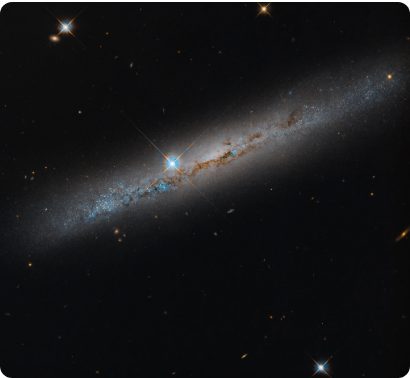
Spiral’s Edge
This NASA Hubble Space Telescope image features the edge-on, intermediate spiral galaxy NGC 1827…
Science on the Space Station with NASA Astronaut Jessica Watkins
NASA astronaut and Expedition 75 flight engineer Jessica Watkins works…
Webb Captures Stellar Jets
NASA’s James Webb Space Telescope has revealed many protostars and stellar jets…
Martian Dawn
The captivating shapes of wind-carved crags called yardangs are revealed…
 Artemis Acceleration (Oct. 23, 2026)
Tune in as agency leaders provide an update on NASA’s plans to return American astronauts…
Artemis Acceleration (Oct. 23, 2026)
Tune in as agency leaders provide an update on NASA’s plans to return American astronauts…
 U.S. Spacewalk Preview News Conference (Oct. 20, 2026)
A preview of two upcoming spacewalks on Oct. 29 and Nov. 5…
U.S. Spacewalk Preview News Conference (Oct. 20, 2026)
A preview of two upcoming spacewalks on Oct. 29 and Nov. 5…
 U.S. Spacewalk 100
Join us for a spacewalk milestone…
U.S. Spacewalk 100
Join us for a spacewalk milestone…
 NASA Moon Base: Rovers and Lunar Terrain Vehicles (October 2026 Update)
There’s a lot of ground to cover when you’re building a Moon Base…
NASA Moon Base: Rovers and Lunar Terrain Vehicles (October 2026 Update)
There’s a lot of ground to cover when you’re building a Moon Base…
A website, a blog, a podcast or any RSS or Atom address. We find the feeds behind it.
For sites without a feed. Load the page, click the list to follow, and Feeder watches it for new entries.
The AI reads the page and turns what changes on it into posts.
The search becomes a feed; new matches arrive as posts.
Subscribe with your Feeder address, or forward mail to it, and each sender becomes a feed.
New videos arrive as posts, with the thumbnail and the description.
Every post becomes a post here, in the order you chose.
Every message in the channel becomes a post. Private groups cannot be followed.
Only the news your team needs. Your widget follows the rules you set in Feeder, so posts a rule filters out never reach your page.
2 of 6 posts reach your site
Design
A simple list or a card grid, in one of 11 themes or your own colors and font. Set any height, turn images on or off, and pick a date style.
Sunset Glow
Your own colors and font
Modern Light
Deep Night
You do it all in Feeder. Your site only needs one line of HTML.
Choose the feed to show. New to Feeder? Add your sources first, on a free account.
A list or cards, a theme or your own colors, and a height.
Intranets, website builders and pages you write by hand. Pick yours to see where the code goes.
Look for a block called HTML, Code or Embed and paste the same line. Or link to the widget's own page.
If your intranet blocks outside content, an admin may need to allow widgets.feeder.co first.
Where to paste it
 SharePoint
An admin may need to allow widgets.feeder.co first.
 Google Sites
If posts are cut off, drag the box taller.
 WordPress
On the classic editor, paste it in the Text tab.
 Webflow
The widget fills the width of the element you put it in.
 Wix
Wix
Make the element as tall as your widget so nothing is cut off.
 Squarespace
The widget fills the width of the block you put it in.
Plain HTML
Prefer a script tag? Feeder gives you that version too.
<iframe src="https://widgets.feeder.co/?frame&widget=…" width="100%" height="600" frameborder="0"></iframe>What you can set, and how it behaves on your site.
Newest first, from one feed in your Feeder. Show images or leave them out, and pick a long date, a short one or none. Links open in a new tab.
The 10 newest posts, scrolling inside the widget
Short is 300 px, Medium 600 and Tall 900, or choose Other and type any height. The widget is as wide as the box it sits in, and more posts scroll inside it.
A simple list or a card grid. Pick one of 11 themes, from Modern Light to Sage Green, or set your own colors, font and font size.
One line of HTML puts the widget on your page. Developers can use a script tag instead, or you can link to the widget's own page. It works anywhere that takes HTML or an iframe.
The widget shows the newest posts every time the page loads, and Feeder checks your sources all day, so there's nothing to paste again. Posts your rules filter out never reach your site.
Embed code pasted on Oct 20. Feeder found 2 new posts since then, on top. Your rule filtered out 1 more.
Build and preview a widget on a free account. Putting it on your site takes Feeder Professional.
| Free | Plus | Professional | |
|---|---|---|---|
| Price a month | Free | $9.99 | $19.99 per user |
| Feeds | 200 | 2,500 | 10,000 |
| Rules | No | Yes | Yes |
| Widgets on your site | No | No | Yes |
Publish
Four tools to share your feeds, in Feeder Professional
$19.99 per user, per month
A widget at work
This is a Feeder widget too, with our own blog in it. It shows the newest posts each time the page loads, just as yours will, and it's where we tell you what's new in Feeder.
Here it is, live